
Apr 10 2026
Understanding Your Medications in the Hospital with MyChart
Summary
MyChart’s hospital stay dashboard helps you view your medication schedule, see what’s been given, and stay informed, so you feel confident and supported.
Inpatient App Features: Accessing Your Medications
A hospital stay could impact your medication schedule. Your doctor might change, pause or add medications, depending on your condition.
If admitted to one of our hospitals, your hospital stay dashboard will automatically reflect an updated medication schedule that you can view.
Medication Timeline
We know it can be stressful not knowing when your medications are scheduled when you are in the hospital. To make this easier, on your hospital stay dashboard, you can access a timeline that lists the times you are scheduled to have medicine administered. You can swipe left or right to move through the hours of the day.
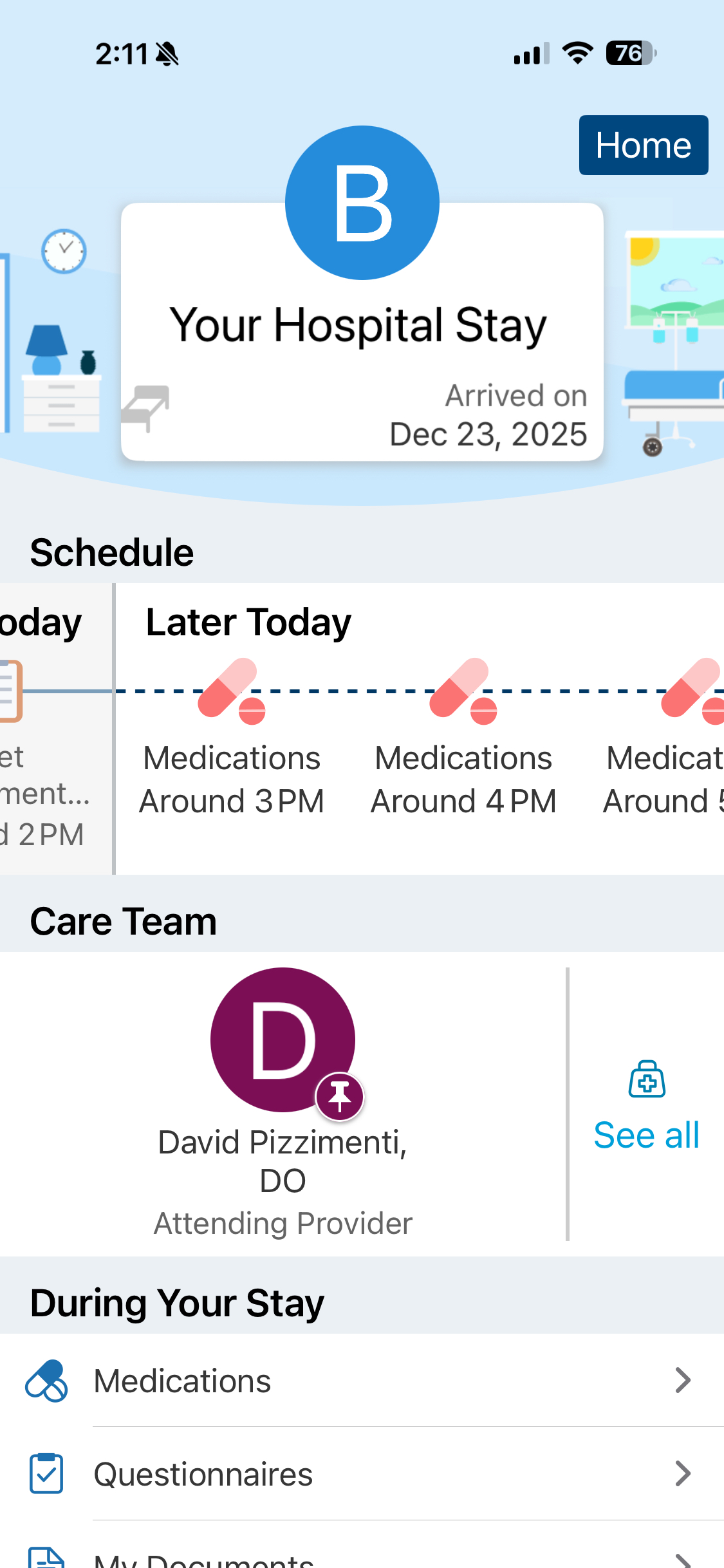
When clicking on a particular time slot, you will see the medicines listed that you are scheduled to receive. If you click on a time slot that has already passed, you will see a list of medicines already administered and the exact times they were given to you.
Accessing a Full List
On the inpatient dashboard’s main menu, found at the bottom of the page, you’ll see a tab for medications. Here, you’ll find a full list of all your medicines, including the prescribing doctors and recommended dosages.
Remember, while admitted as an inpatient, all medicines will be given by your care team. If your medicines have changed or if you have questions or side effects related to a medicine, talk to your care team.
Once you’ve been discharged from our care, your medications can be found in your MyChart app.
Don't Have MyChart Yet?
If you are not already a MyChart user, this page walks you through downloading the app and gaining access to the dashboard.
You will only be able to view "My Hospital Stay" on the MyChart mobile app. This view is not available on the webpage version of MyChart (i.e., Chrome or Edge browser).
Having issues with MyChart? Call our MyChart customer service line at (844) 263-4442. Please note that you must be able to verify your date of birth, zip code, home phone number and email address on record. The activation code will be sent to your email address on file.

myConnection
Schedule your next appointment, start an E-visit, communicate with your doctor, request prescription refills and access your test results — just a click away.
Related Links
Topics
- Digital Access
- Managing Your Health
Share

Subscribe to Our Newsletter
Like this content and want to get more? Sign up for True North, the health and wellness newsletter from North Mississippi Health Services!
Subscribe to Our Newsletter
Like this content and want to get more? Sign up for True North, the health and wellness newsletter from North Mississippi Health Services!

Nurse Link®
Not sure if you need Urgent Care or the ER? Call 1-800-882-6274 anytime to speak directly to a registered nurse and get immediate answers. Using computerized medical protocols, nurses direct callers to the most appropriate treatment. Our nurses are available 24 hours per day, seven days per week.